
Contact sales now: info@ecommercetemplates.com
Ecommerce Templates > General Help > The Control Panel > Main Admin Settings
This page contains some of the crucial settings for your Ecommerce Template store and we have detailed the various options below.
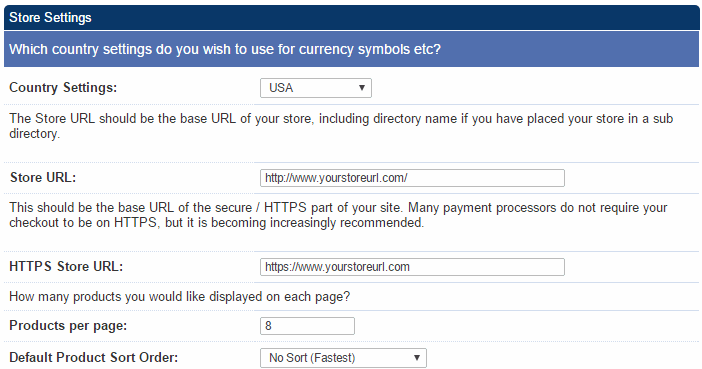
Country Settings
This is where you specify where you are selling from and the currency
on your store will adjust accordingly. It will also affect such things
as the date display format, tax settings and the shipping estimator.
The currency format can be overwritten on your store if necessary.
Store URL
This is a very important setting as it is used widely on the store.
Make sure the URL is the full URL of your store, this would normally
be http://www.yourstore.com/ but if you have placed your files
in a separate folder then you would need to change the setting
accordingly. There is a suggestion above the box that should help
you. Do not add a page name such as index.php or categories.asp
to the setting here.
HTTPS Store URL
This is an optional field and only needs to be used if you have an ssl certificate installed on your site or if you are using a shared ssl certificate from your host. You should enter the URL of the https location (this was previously set in vsadmin/includes.asp or vsadmin/includes.php using the pathtossl parameter).
Products per page
This is where you specify how many products you would like to appear
on your products page. Too many products will cause the page to
load more slowly, too few and your users may have to click through
many pages to get to what they are looking for so a value of perhaps
6 to 12 is a happy medium.
Default product sort order
Here you can choose how your products are listed on the products
page, whether you want them ordered alphabetically, by price,
date etc.
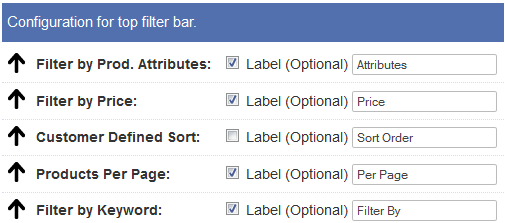
This feature will appear on your products page and allows customers to filter the product listings by Manufacturer, Price, Keyword etc. To turn the feature on you will need to check one or more of the checkboxes. There are css classes included for formatting the look.
Filter by Prod Attributes
This allows you to group products together using your own criteria.
You will first need to create your groups by clicking on the
link in the admin home page for "Product Attributes". For
example you might want to create groups for brand new products,
nearly new and second-hand so the label you might want to enter
here would be "Condition". Once you have set up those groups,
you will then want to assign your products to each group through
the product admin pages...read more
Filter by Price
You can provide a drop down of pricing bands to your customers
so they can filter the product listing by price. By default price
bands are of $100 but you can set your own thresholds
in vsadmin/includes.asp with for example
filterpricebands=150
or in vsadmin/includes.php
$filterpricebands=150;
Customer Defined Sort
This allows you to choose between the different sort methods
so a customer can choose to have the product listing sorted alphabetically,
by price, by most recent etc.

The default text here can be changed in vsadmin/includes.asp or vsadmin/includes.php depending on your version.
The number of sales increases with each sale and is based on the number of sales rather than quantity sold of each item. In the product admin page you can regenerate the sales stats, choosing the time period you want to base sales data on. Popularity is based on visits to the product detail page. Both these sort option values can be edited in the product admin Quick Entry feature.
Products Per page
The customer can choose how many products will appear on the page.
The multiples come from the main products per page setting.
Filter by Keyword
The customer can enter their own search terms to find the product
they are looking for. The search will be based on the product
name, id, description and additional search parameters.
More details on the product filter bar and ECT Side Filter Bar Plugin are available here.
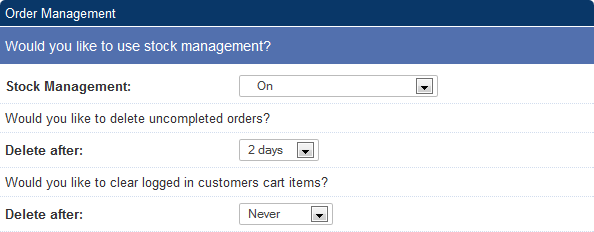
Stock Management
If you want to use the Stock Management
feature then it can be turned on here by choosing "On" from the
drop down menu  more
details
more
details
Delete after (uncompleted orders)
Set the time period you would like uncompleted orders to be
deleted from your database. You will need to hit the Purge Deleted
button in the orders admin page to completely get rid of all
deleted orders from your database.
Delete after (clear logged in customers cart items)
This is the amount of time you can set for items to remain in the cart of a logged in customer.
Following a successful order on your store you will be notified by email if you have checked the Email confirmation box. The email will be sent to the address specified below that. It's important that the email is valid for the domain so you@yourdomain.com would be correct, you@anotherdomain.com would not. For the PHP version that should be all the information that is required. For the ASP version you will see the extra fields outlined below and these along with our email troubleshooting guide are outlined here.
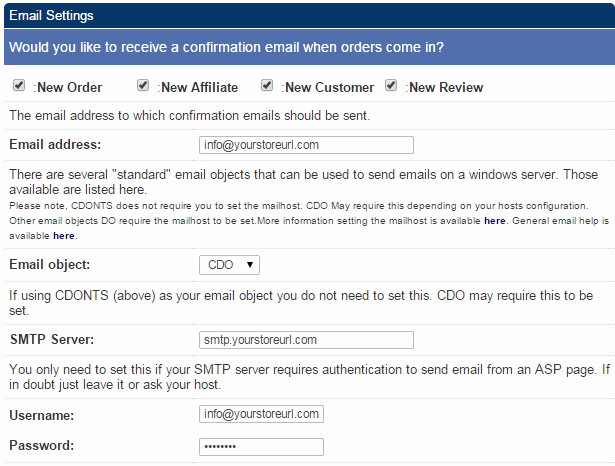
From Version 6.4 you can send the order email to multiple recipients by entering the email address separated by a comma like this you@yourstoreurl.com, me@yourstoreurl.net, them@yourstoreurl.org
In Version 6.5 you can choose if you want to be notified via email of a new order, a new affiliate or customer account sign up or if a new review comes in.
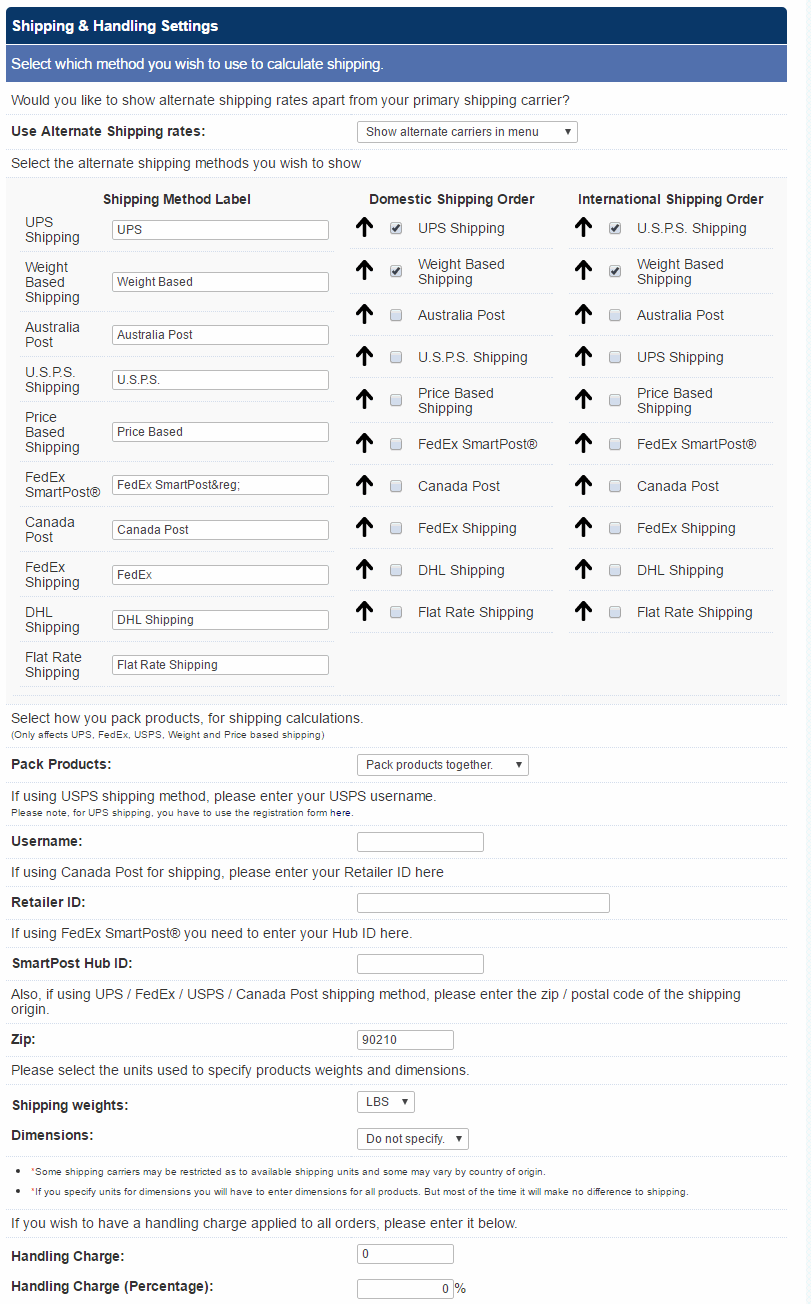
Shipping type
Here is where you can specify the shipping method you want to employ
on your store for domestic and international customers. more details
Use alternate shipping rates
If you don't want to give your customers a choice
of shipping methods on checkout, select "Don't use alternative
rates". Selecting "Show alternate carriers in menu" will give the
customer the choice of selecting the shipping carrier from the
ones you select and then choosing the method they want the purchase
to be shipped by. Choosing "Show all shipping carriers together"
will present rates for all the shipping methods you select on the
same screen.
Alternate shipping
Use the arrow to set the order of the shipping methods presented
to your customers.
Select which methods you want to support by checking the box next to each carrier,
the first is for domestic shipping, the second for international.
Use the text field to label each of the methods.
Pack products
Selecting Pack products together will add all the product weights
together and take the shipping cost on this total. Pack products
separately will take the shipping cost for each item and then add
these together. In Version 6.5 you can make individual products "Pack Products Together" exempt by selecting that choice in the product admin page.
Username
If you are using USPS shipping on your store then after registering
for a user name with USPS you would enter it here. more details
Retailer ID
This is only required if you are using Canada Post as the shipping
method. more details
SmartHub ID
This is only required if you are using FedEx SmartPost®
Zip
This is the zip (postal) code of where you are shipping from. Only
one zip code can be used in the process of calculating shipping
costs.
Shipping weights / Dimensions
This is where you can choose between the metric and imperial systems.
Do note that some shipping carriers may restrict the available
shipping units and some may vary by country of origin. If you specify
units for dimensions you will have to enter dimensions for all products.
But most of the time it will make no difference to shipping.
Handling charge
The value specified here will be added to the order total
to cover handling costs. It is possible to add a per payment provider
handling charge, a handling charge as a percentage of the order total
and add tax to the handling.
ASP version
PHP version
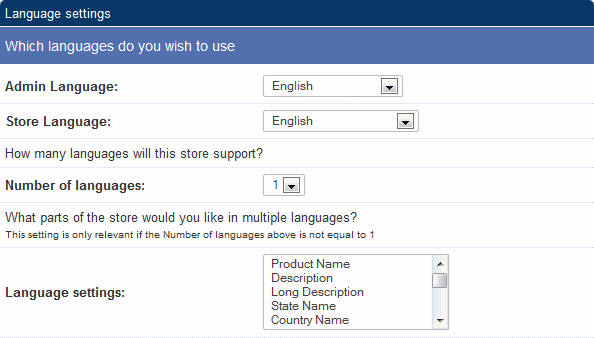
Admin Language
The language you want for your control panel
Store Language
The language you want to show on your public store pages
Number of languages
If you are going to run more than one language
off the same database then this is where you specify the number,
maximum of three. more
details
Language settings
This is also used with the multiple
language settings and here you can choose which fields you want
to appear in your
alternative languages. more
details
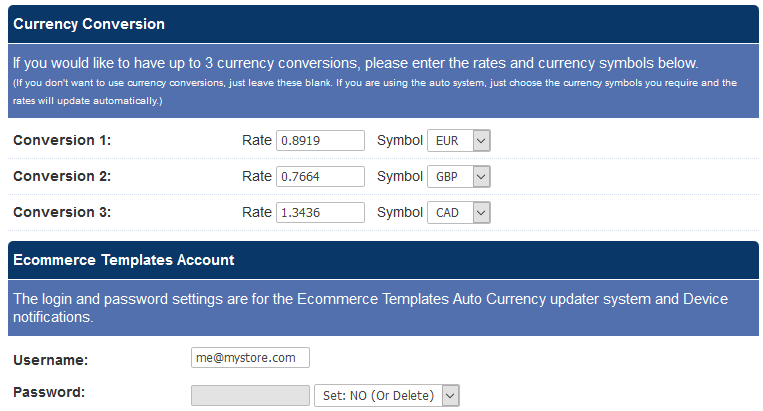
It is possible to show your product prices in up
to three other currencies other than the default. The alternative
prices will be shown on your product and product detail pages below
the main default price. Sales will always be processed in the default
currency but it does provide a guide for international purchasers
regarding the approximate price in their local currency... more details
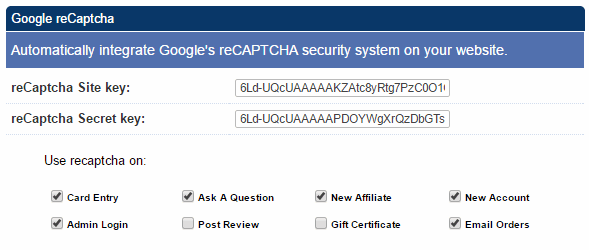
This was introduced in Version 6.6 and allows you to protect various forms from malicious bots. You can choose which of the features you want to protect by checking the boxes in the display as above. This will create a Captcha screen such as the one here
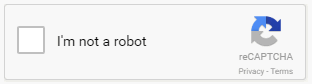
Humans will be able to check the "I'm not a robot" checkbox whilst visiting bots won't be able to. You may also find there is a picture recognition screen for further checking.
Apart from checking the boxes you will also need your own v2 Site Key and Secret Key. These are available at https://www.google.com/recaptcha/admin and should be pasted into the fields as above.
If you make a mistake in the Secret Key and have set the reCaptcha on the admin login you will need to download the password reset file to disable reCaptcha on your site.
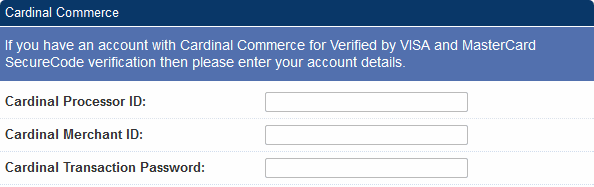
If you are going to implement the Cardinal
Commerce 3D Secure system to provide Verified by VISA, Mastercard
SecureCode and J/Secure functionality, enter the details here.
more details
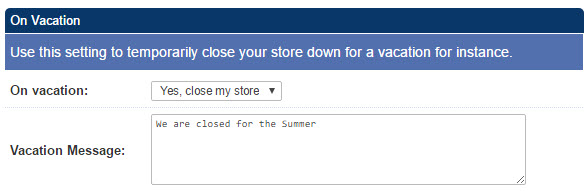
If you need to turn off ordering from your store you can choose the option "Yes, close my store" and set a message that will appear on your public cart page. This will stop people from checking out on your store until set to "No" here in the admin. (Version 6.7 required).