Shopping cart software for Dreamweaver, Frontpage, CSS and Expression Web templates 

Mobile Site | UK Store
Ecommerce Templates
Shopping cart software

Home > General Help > Currency converter

Currency converter

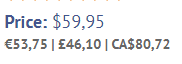
It is possible to show your product prices in up to three other currencies other than the default. The alternative prices will be shown on your product and product detail pages below the main default price. Sales will always be processed in the default currency but it does provide a guide for international purchasers regarding the approximate price in their local currency.
Currency

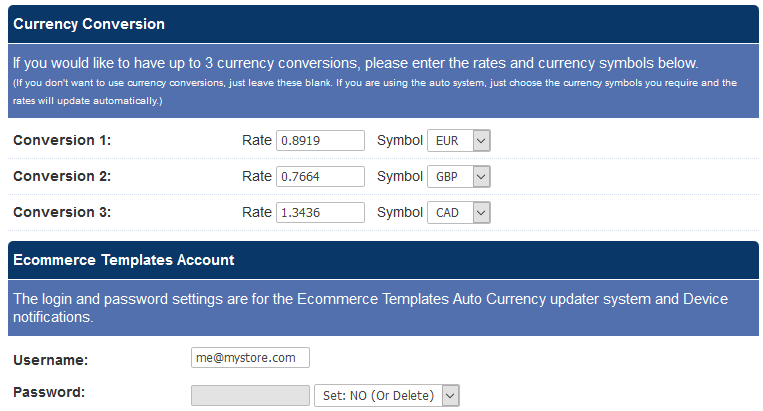
On the main admin page you can set your own rates and change them when you like by filling in the rate field and selecting the currency of your choice from the drop down menu for symbols. This would have to be done regularly to keep up to date with currency fluctuations.

Alternatively it is possible to connect to our currency updater. This is currently a free service using the username (testuser) and password (testpw) but in the future there will be a monthly charge for connecting to our updated rates. Although updated regularly these will only ever be approximations and we strongly suggest that you make that clear on your store.

The currencies currently supported are:

  • Danish Krone (DKK)
  • Swedish Krone (SEK)
  • New Zealand Dollars (NZD)
  • Australian Dollars (AUD)
  • Canadian Dollars (CAD)
  • Swiss Francs (CHF)
  • Euros (EUR)
  • British Pounds (GBP)
  • Japanese Yen (JPY)
  • United States Dollars (USD)
  • Bulgarian Leva (BGA)
  • Chinese Yuan (CNY)
  • Cypriot Pound (CPY)
  • Czech Republic Koruny (CZK)
  • Estonian Krooni (EEK)
  • Hong Kong Dollar (HKD)
  • Croatian Kuna (HRK)
  • Hungarian Forint (HUF)
  • Indonesian Rupiahs (IDR)
  • Icelandic Kronur (ISK)
  • South Korean Won (KRW)
  • Lithuanian Litas (LTL)
  • Latvian Lats (LVL)
  • Maltese Liri (MTL)
  • Malyasian Ringgits (MYR)
  • Norwegian Kroner (NOK)
  • Philippine Peso (PHP)
  • Polish Zlotych (PLN)
  • Romanian Lei (ROL)
  • Russian Rubles (RUB)
  • Singapore Dollars (SGD)
  • Slovenian Tolars (SIT)
  • Slovakian Koruny (SKK)
  • Thailand Baht (THB)
  • Turkish New Lira (TRY)

If you do not want to show alternative currencies on your product and product detail pages then leave all the fields blank and the feature will be ignored on your store.


Buy now for ...

buy now

How it works

  • 1. Download template
  • 2. Edit design in your web editor
  • 3. Upload to your server
  • 4. Add products using online admin
  • 5. Select your credit card processor
  • 6. Start selling on the web!
read more
how it works

General help

General help

Updates

Updates

Search our site

Search

Accept Credit Cards Online

Paypal Certified integration authorize.net certified. Sign up now. Amazon Payments

UPS Online Tools Protx Partner Worldpay

Credit cards acceptedFind us on FacebookFollow us on twitter

how to purchase · site map · license + warranty · mailing list · privacy policy
Australia · Canada · España · France · Germany · Holland · Ireland · Portugal · South Africa · UK

© Copyright 2002 - 2010 Shopping cart software by Internet Business Solutions SL - All Rights Reserved - Ecommerce Templates™ and Ecommerce Plus ™ are registered trademarks of Internet Business Solutions SL