
Contact sales now: info@ecommercetemplates.com
Ecommerce Templates > ASP Version Help > Payment Processors > Mirapay

Once you have created your account with Mirapay the first thing you will need to do is download the file mirapayasp.zip from our downloads page. The zip file contains two files, customppsend.asp and customppreturn.asp. Unzip the download and place the two files in your vsadmin/inc/ folder, overwriting the existing files - agree to overwrite if prompted.
Make sure you have uploaded these two files to your server and open your ecommerce template admin payment providers page. Locate the payment provider listed as "Custom" and click on the Modify button. Fill in the details as shown below:
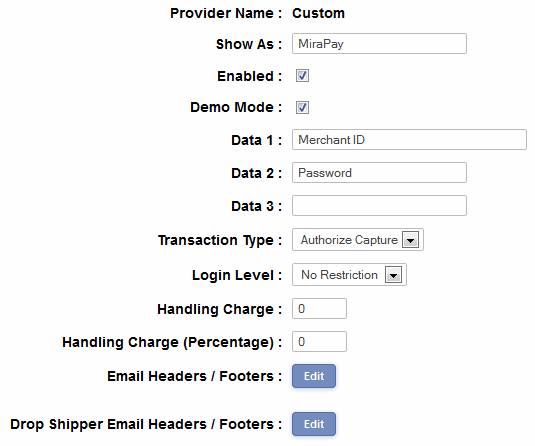
In the box Data1 you will need to place your MerchantID and in Data2 the password they sent you. There is no demo mode available.
Please do read our guide here on credit card fraud.