
Contact sales now: info@ecommercetemplates.com
Ecommerce Templates > General Help > The Control Panel > Gift Certificates
In Version 5.6 we introduced the Gift Certificate feature. This allows your customers to purchase a gift certificate on your store for the amount of their choice and send it on to their chosen recipient. The difference between the value of the certificate and the product(s) added to cart is calculated and the difference recorded accordingly. The recipient is notified via an email which includes a personalized message and the code they will need to enter on checkout to redeem the gift certificate.
ASP Version: Save products.asp as giftcertificate.asp and then in code view find the line
<!--#include file="vsadmin/inc/incproducts.asp"-->
and change it to
<!--#include file="vsadmin/inc/incspecials.asp"-->
Upload to your server and make sure it is working as it should.
If you don't want to set up your own gift certificate page then you can just add a link in your menu to proddetail.asp?prod=giftcertificate and that will show the gift certificate page.
PHP Version: Save products.php as giftcertificate.php and then in code view find the line
<?php include "vsadmin/inc/incproducts.php" ?>
and change it to
<?php include "vsadmin/inc/incspecials.php" ?>
Upload to your server and make sure it is working as it should.
If you don't want to set up your own gift certificate page then you can just add a link in your menu to proddetail.php?prod=giftcertificate and that will show the gift certificate page.
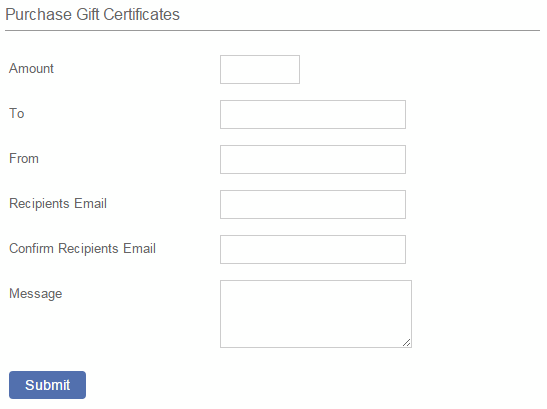
Once the customer has filled in the form you can see above they will go through checkout as normal. The store owner will receive notification via email of the purchase as well as the buyer and the recipient.
The recipient can then go on to the store and use their gift certificate to purchase the product of their choice. On checkout they will see a field to enter their unique code

If the value of the gift certificate is higher than the item purchased then the remaining amount will be saved for use at a later date. If the shopping cart total is higher than the value of the gift certificate then they can continue with the checkout and pay the difference through the store.
When you click on the Gift Certificate Management link in the home page of your control panel, you should see a screen similar to this
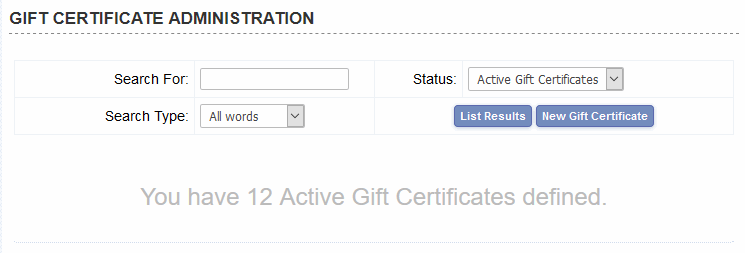
From this screen you can view all the active and inactive gift certificates as well as generating new ones if you need to.
Listing the results will show a screen like the one below
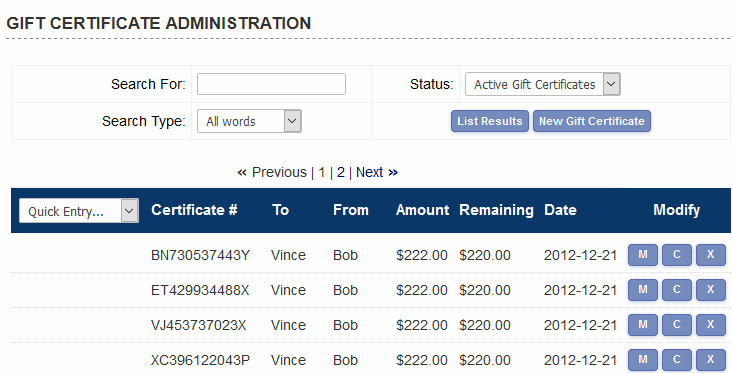
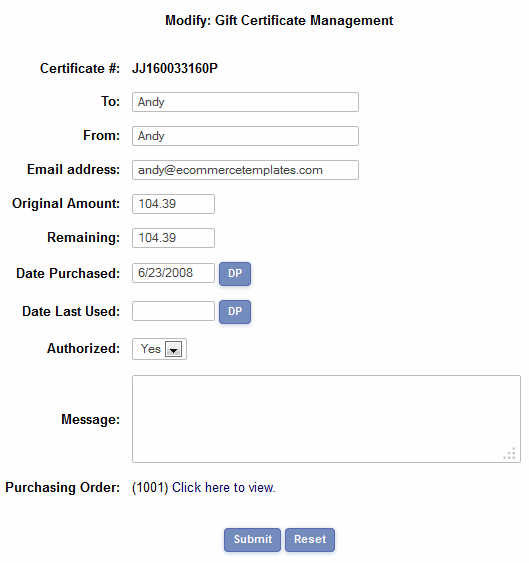
This provides a summary of the gift certificates that have been purchased on the store and their current status. Clicking on the Modify button will give you the chance to see the full details as well as the ability to make changes, view the orders and issue a refund.
The admin orders page also contains a link to the gift certificate purchase

The email that is sent to the buyer and seller can be formatted in the Email Message Admin page of the control panel.
When a gift certificate is purchased an email is sent to the buyer and the recipient, confirming the order and including the gift certificate code that will be redeemed on checkout. You can edit the contents of the email through the Email Message Admin page. The instructions are available here
Gift certificate recipient email
Disable payment types for gift certificate purchase
You may want to disable some payment types if offering gift certificates on your store. For example using Email would mean that the customer receives the certificate before payment. To specify a list of payment providers you want to disable you need to set...
noemailgiftcertorders="4,17" in vsadmin/includes.asp
or
$noemailgiftcertorders="4,17"; in vsadmin/includes.php
...where each number is the id of the payment provider listed in the payment provider admin page. In this case email (4) and email 2(10).
Set minimum value for gift certificates
If you need to set up a minimum purchase value for the gift certificate you will need to set the following...
giftcertificateminimum=10 in vsadmin/includes.asp
or
$giftcertificateminimum=10; in vsadmin/includes.php
By default gift certificates do not get charged taxes, handling, etc. But, if you want to "fine tune" the setup for these products as for other products then just create a product in the admin products page with the product id "giftcertificate". Then you can change the settings for these products as for any other product and it will be liable for tax unless you set it to tax exempt in the exemptions. You will probably want to make it exempt from shipping and handling in the exemptions section.