Contact sales now: info@ecommercetemplates.com
Ecommerce Templates > General Help > FedEx shipping

Setting up your Ecommerce Plus template to use FedEx shipping rates to automatically calculate your shipping costs is a simple matter. Please note this is currently only available to US and Canadian merchants.
Firstly, log in to the admin section for your Ecommerce Plus template and click on "Main Settings" and scroll down the page. From the Shipping Type dropdown menu select FedEx Shipping.

On the same page you will see a setting "Shipping Units" where you can define the weight units that are used to define your product weights. Please note that the shipping units are limited in some countries. Notably, the United States is limited to specifying product weights in lbs and ounces.
Now click on Shipping Methods from the top menu and click on Register with FedEx.
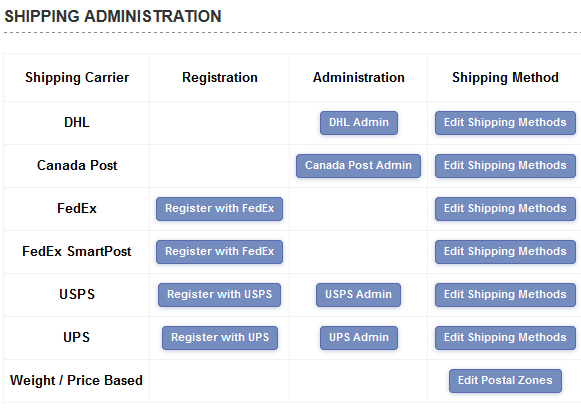
and follow the steps in the registration wizard. Once you are registered you will want to choose the shipping methods you want to accept on your store so click on the Edit Shipping Methods button and check the appropriate choices.
You are now ready to test your system. Try adding a product to your cart where you know the weight of the product. Then in the checkout phase after filling out your customer and shipping information, you should see the available FedEx shipping options along with the associated costs. You should do a couple of tests to make sure they match what you would expect from the FedEx online shipping calculator at www.fedex.com.
It's possible for customers to track their orders from a page
on your site - if you don't have the tracking page, all you
need to do to enable it for the ASP version is take a copy of
products.asp and call it tracking.asp
Then go to HTML view and change the line
<!--#include file="vsadmin/inc/incproducts.asp"-->
to
<!--#include file="vsadmin/inc/inctracking.asp"-->
For the PHP version save products.php as tracking.php then go into HTML view and change
<?php include "vsadmin/inc/incproducts.php" ?>
to
<?php include "vsadmin/inc/inctracking.php" ?>
You can choose the delivery options for FedEx with these additions to vsadmin/includes.asp or vsadmin/includes.php depending on which version you are working from.
If you get FedEx Account Rates and the rates returned by the store don't appear to match what you would expect, your account manager may ask for the XML file for the shipping. To get this set the following in vsadmin/includes.asp
debugxmlemails=TRUE
or in includes.php
$debugxmlemails=TRUE;
That will provide you with an email containing the xml shipping information once you've put through a test order. When you have finished, remove that line so debug information isn't passed on for subsequent orders.