jezze
Ecommerce Template Expert
USA
608 Posts Pre-sales questions only (More Details...)
|
 Posted - 04/15/2026 : 11:19:02 Posted - 04/15/2026 : 11:19:02

Hello Everybody
Can somebody tell me how to add H1 titles with Ckeditor ver 3.6.5?
I'm using Ckeditor
When I try to add H1 tags to a title, I only see the css code form my site
Jezze
Ecommerce Plus ASP v7.7.6
|
dbdave
ECT Moderator
USA
10733 Posts |
Posted - 04/15/2026 : 11:51:10
flip to code view and enter manually <h1>some h1 text here</h1>
Be sure to check that you do not already have an H1 tag on the page - most sites do and if so, make it H2 instead.
David
|
jezze
Ecommerce Template Expert
USA
608 Posts Pre-sales questions only (More Details...)
|
Posted - 04/15/2026 : 13:05:04
Hi Dave,
Thanks for your help
According to Google and Bing, for SEO , product pages must have only one H1 tag
but my site, uses the Responsive ASP Beauty template.
This template automatically formats the following to H1 titles
Our Products
Shopping Cart
More Links
Client Login
How can I change the above to h2 tags instead of h1 tags?
I just want to have one main title with h1 and the rest of the subtopics with h2 tags
Thanks again for your help
Jezze
Ecommerce Plus ASP v7.7.6
|
dbdave
ECT Moderator
USA
10733 Posts |
Posted - 04/15/2026 : 15:54:09
That's a great question.... For Vince...  You might want to make a post in the suggestions forum regarding this as I think you may be right. Thanks, David |
Vince
Administrator
43449 Posts |
Posted - 04/16/2026 : 01:43:09
|
jezze
Ecommerce Template Expert
USA
608 Posts Pre-sales questions only (More Details...)
|
Posted - 04/22/2026 : 17:16:21
Hi Vince
About your suggestion below
"just change them in your website editor"
I'm using Ckeditor version 3.6.5 and I don't see any options to format in H1 or H2
When i try to format titles in H1 I only see this code included on my site css file "h1.mennav" which brakes my sites desgin.
Any suggestions how to be able to format my site to H1, h2 and H3 using Ckeditor or any other editor?
Jezze
Ecommerce Plus ASP v7.7.6
|
Vince
Administrator
43449 Posts |
Posted - 04/27/2026 : 10:53:03
|
Phil
ECT Moderator
United Kingdom
7844 Posts |
Posted - 04/27/2026 : 11:51:25
|
jezze
Ecommerce Template Expert
USA
608 Posts Pre-sales questions only (More Details...)
|
Posted - 04/27/2026 : 12:10:23
Hi Phil,
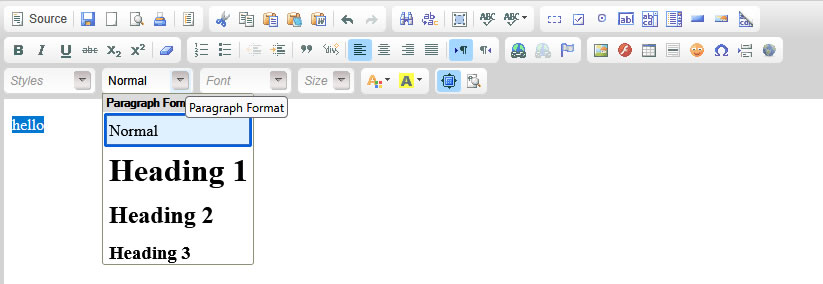
My Ckeditor interface does look like yours?
What version of Ckeditor are you using?
My Ckeditor version is ver 3.6.5
Thank you for your help
Jezze
Ecommerce Plus ASP v7.7.6
|
Phil
ECT Moderator
United Kingdom
7844 Posts |
Posted - 04/27/2026 : 12:15:34
|
jezze
Ecommerce Template Expert
USA
608 Posts Pre-sales questions only (More Details...)
|
Posted - 04/27/2026 : 14:14:05
Hi Phill,
I clicked on little blue star like symbol the page goes to full mode view without the same options like in your picture.
What could be wrong?
Jezze
Ecommerce Plus ASP v7.7.6
|
Phil
ECT Moderator
United Kingdom
7844 Posts |
Posted - 04/27/2026 : 14:28:29
Edited by - Phil on 04/28/2026 05:08:19
|
jezze
Ecommerce Template Expert
USA
608 Posts Pre-sales questions only (More Details...)
|
Posted - 04/28/2026 : 14:35:15
Thanks a lot for your help Phil
I finally found the options I was asking for.
It was a small arrow hidden on the full page view
Jezze
Ecommerce Plus ASP v7.7.6
|
| |
|






 CKeditor How to Add H1 Titles