
Contact sales now: info@ecommercetemplates.com
Ecommerce Templates > PHP Version Help > Payment Processors > InternetSecure

Click here to create an account with InternetSecure.
The set up for InternetSecure uses their Authorize.net emulator so the set up is quite simple. The credit card details are taken on your own site so you will need a SSL certificate installed (either your own or shared from your host). You do not get to see the credit card information as that is stored on the InternetSecure side of things, not in your order admin.
You can follow our instructions here for setting up on a secure server and then you are ready to start the integration.
In your Ecommerce Template admin, go to the Payment Providers section, click "Modify" for Authorize.net (AIM) and enter your Merchant # in the field for Merchant Login ID and leave the Transaction Key field blank.
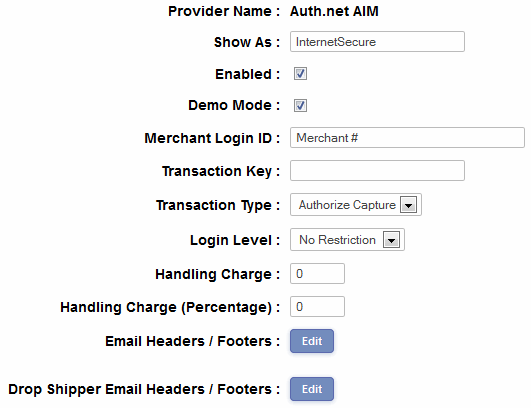
Hit the submit button and you are nearly finished.
The final step is to open vsadmin/includes.php and add the following
$authnetemulateurl="https://secure.internetsecure.com/process.cgi";
Once you have done that, you will need to email your IP address to the Merchant Services Team at InternetSecure so they can add it to your profile and recognize your transaction requests when they go through.
If you receive an "Access Denied" error it means that the IP address hasn't been added to your profile and you will need to contact them about that.
Please do read our guide here on credit card fraud.
That's all there is to it really - any comments on the set up can be posted on our Support Forum.