
Contact sales now: info@ecommercetemplates.com
Ecommerce Templates > PHP Version Help > Payment Processors > Linkpoint

Click here to create an account with Linkpoint.
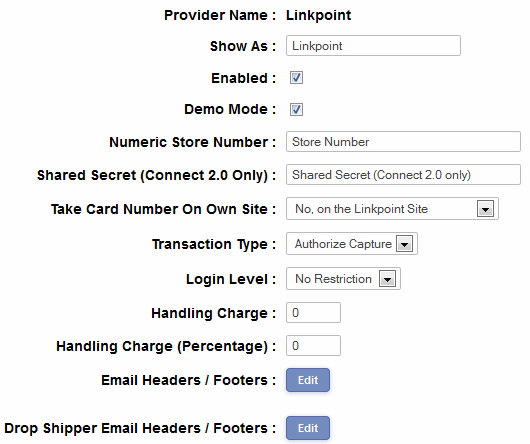
In your Ecommerce Template admin, go to the Payment Providers section, click "Modify" for Linkpoint and enter your Store number and select from the drop down menu whether you want the credit card details to be taken on the Linkpoint secure server or whether you want to process the transaction on your own site (this will require your own SSL certificate and you may want to read about setting up on a secure server). Make sure the system is set to "Enabled".
Now you need to login to Linkpoint and select the customize link and set the return url to http://www.yourstore.com/thanks.php and the declined return URL to http://www.yourstore.com/sorry.php
You will also need to set the Order Submission Form URL, which will be the URL of your cart page eg.
http://www.yoursite.com/cart.php
. . . or . . .
https://www.yoursite.com/cart.php
Finally select the check box that says "URL is a CGI script". Do this for both the approved return and declined return url. Update the url list on my linkpoint admin section so that it would accept the transfer. For those who care to know simply copy the url from the checkout page on your site and paste it in the url section of the linkpoint account page. If there is more than 1 url that you are connecting put a space between them.
Make sure the following has been done in the Linkpoint administration:
You need to login to Linkpoint and select the customize link. Now set the return urls to http://www.yourstore.com/thanks.php - make sure you check the boxes for automatically return to specified URL for both thanks.php and sorry.php pages.
Finally select the check box that says "URL is a CGI script". Do this for both the approved return and declined return url.
Make sure you have set the pathtossl in vsadmin/includes.php if taking the orders on your own server as in the help here.
Please do read our guide here on credit card fraud.
For more information, rates and support, please visit the Linkpoint website.